3D World Tile for Unity
A downloadable package
This is a small collection of shaders which will allow you to create world-oriented textures, which means up is always up and disparate objects will tile together. See the video for details.
Please note also, this is essentially a remix of several good ideas by other people, so if something looks familiar that's probably because it's a source.
Built in v6000.5.0f1 for URP.
Contents
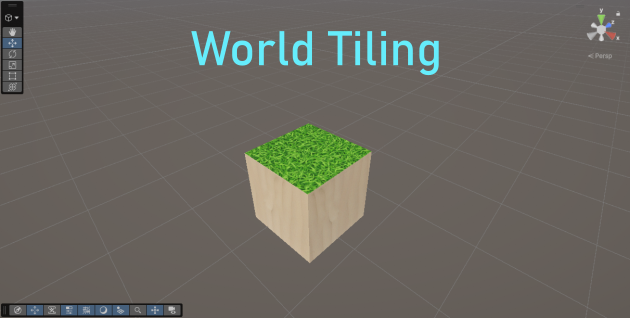
World Tile
This is the most basic variant. It applies one texture to the top and bottom, and another everywhere else. It looks odd on spheres because the algorithm tends towards a square.
- Top Texture: This will apply to the top and bottom.
- Top Scale: Controls the zoom of Top Texture. Higher number = more zoomed out.
- Side Texture: This will apply to all non-vertical sides.
- Side Scale: Controls the zoom of Top Texture. Higher number = more zoomed out.
- Top Tolerance: Determines acceptable angles for a point to be considered vertical, and therefore apply Top Texture. 1 = whole object, 0 = none of it. Note: The default value is 0.7, or about 45 degrees. I think 0.5 is roughly 30 degrees.
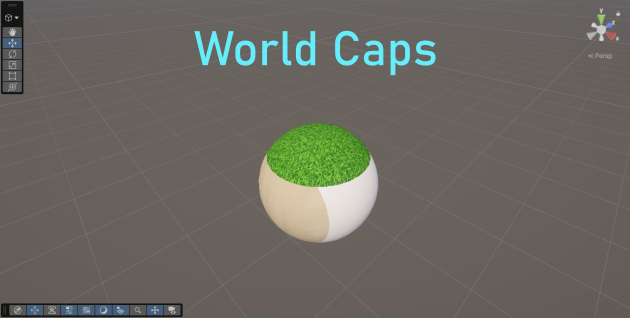
World Caps
This applies a circular 'cap' from all six directions. Top / Bottom (y axis) takes priority, then Front / Back (z axis), but this can be switched around fairly easily within the shader graph. Not pictured (see the video!), but this works great on cubes and other polygonal shapes
- Top Texture / Scale: Applies to the Y+ side. Higher scale number = more zoomed out.
- Bottom Texture / Scale: Applies to the Y- side. Higher scale number = more zoomed out.
- Left Texture / Scale: Applies to the X- side. Higher scale number = more zoomed out.
- Right Texture / Scale: Applies to the X+ side. Higher scale number = more zoomed out.
- Front Texture / Scale: Applies to the Z- side. Higher scale number = more zoomed out.
- Back Texture / Scale: Applies to the Z+ side. Higher scale number = more zoomed out.
- Face Greed: Controls the size of each cap, smaller numbers = larger caps. I don't recommend changing this from the default (0.577).
- Default Colour: The 'underneath' colour that will show between gaps if you shrink the caps. Edit the shader graph if you want this to be a texture instead.
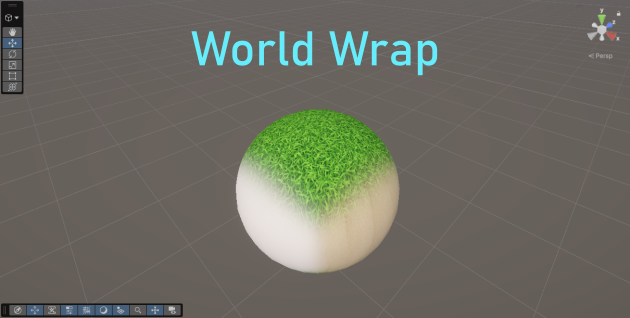
World Wrap
This applies three textures based on world axis (in a sort of 'squircle' shape), and lets you control their blending. In an ideal world, this would be six-sided (allowing the top to differ from the bottom, etc) but I haven't worked out the maths for that, sorry.
- X Texture / Scale: Applies to the left and right sides. Higher scale number = more zoomed out.
- Y Texture / Scale: Applies to the top and bottom sides. Higher scale number = more zoomed out.
- Z Texture / Scale: Applies to the front and back sides. Higher scale number = more zoomed out.
- Axis Priority: Controls the borders between each texture. Higher number for an axis = more defined edges, less area. Note: if you want a more natural, blended look, try 2,2,2.
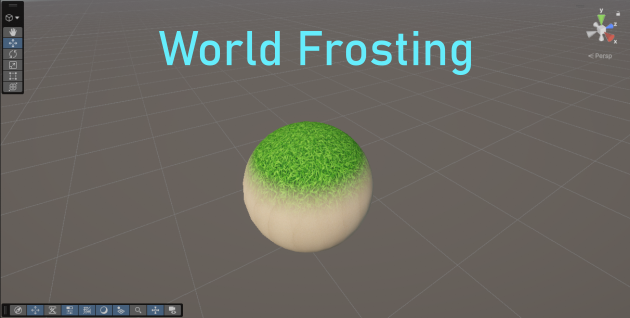
World Frosting
My personal favourite. Applies a base texture universally, then covers the top with another, like frosting on a cake. Great for snow or grass, but can look odd on objects with large flat faces.
- Base Texture / Scale: Applies to the whole object, except where covered by Frosting. Higher scale number = more zoomed out.
- Frosting Texture / Scale: Applies from the top down. Higher scale number = more zoomed out.
- Frosted Height: Kind of an inverted high tide line. Sets the height at which the base will begin to blend into frosting. 0 = halfway up the object.
- Blur Height: Set's the point at which the blur ends, and frosting is 100% opaque. 0 = halfway up the object. Note: keep this higher than the Frosted Height or you'll flip the textures.
Misc. Notes
- All shaders include a Smoothness slider, which should be familiar. Metallic, Emission, Occlusion can be added simply, but it seemed too niche to clog the UI by default.
- Credit is appreciated but not required if you use these. Although I'd appreciate if you comment or message me, just so I'm aware :D
- If you want help modifying any of these, or have a suggested improvement, my proverbial door is always open.
- Please don't use the included images in your final game!! They're random placeholder textures I had lying around, and they're probably from a licensed pack. If you happen to own these and want them removed, get in touch.
Download
Install instructions
Drag and drop this bad boy straight into your unity project's asset browser, should be clear from there.
Leave a comment
Log in with itch.io to leave a comment.